Fast Iteration and Customisability in Limited Time
One of the early considerations for an RTS was needing an extensive UI system. We would need buttons, menus, and various other UI features that let us display varied and dynamic information to the player. In early planning, when it was initially assumed we would have a more ‘traditional’ RTS, I had toyed around with and set up simple events for each UI element (On Clicked, Hovered and Released etc) and colliders (On Trigger Enter, Stay and Exit).
All this led me to realise that implementing these in a reasonable way would require something a bit disgusting, and difficult to edit, like a large registry of function pointers. These would be annoying to serialise, and also limit the data that could be passed into the function to hard coded values. All this felt too rigid to be a useable system, and instead, I wanted to build something that would be malleable, adaptable, and versatile across each unique element of the project. Something that let us easily have two buttons with different functionality entirely, but also two buttons with the same core functionality, but easily editable variations for our designer, Steph.
The above was my goal when creating the initial concept and structure for the 'extender script' system.
It was conceived during the early days of our Alpha milestone, where two core features were needing to be implemented, and both
required similar logic: Control Points, and Minion Regeneration Zones. Both required similar behaviour to what you would consider an 'On Trigger Enter' event,
and in turn, an 'On Trigger Exit' event. We had an object oriented approach to our development. And our Colliders already had a somewhat clear inheritance system, we had
both 'Circle' and 'Polygon' colliders, and adding a needless 'Control Point' that inherited from Circle, and 'Regen Zone' that inherited from Polygon felt bloated and
inconvinient.
As such, I decided to take on a challenge, simple native C++ scripting for Colliders, and eventually UI, with doors left open for any element in the scene to contain an 'Extender Script'.
Why "Extender?"
In retrospect, this was a necessary and helpful limitation. The language of 'Extender' encouraged me to narrow my focus on what the system needed to do. It was not there to add sweeping and new functionality and infinite versatile components, it was there to lend simple, unique behaviours to existing components.
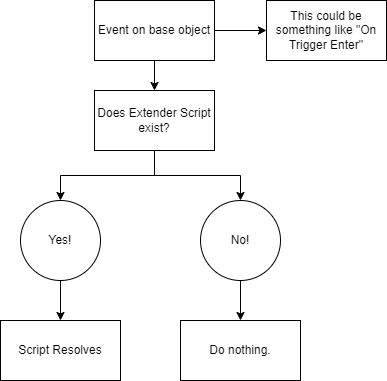
By limiting the scripts to simple events they could be quickly, and safely, implemented.
These limitations also let me narrow the planning and implementation of the base 'Extender' class. They implemented generally the same set of core functions all other
components in the scene contained, Start, Update, Draw, Stop. While other objects in the scene contained other methods (such as pre-updates), Extender Scripts were
always managed by an existing component type, and as such, any extra functionality that was needed in those steps was managed by them.
And so, once a script was written, it was as simple as declaring it as visible to the Extender Factory, and creating the instance!
What did we use them for?
In short, a lot of the game's functionality is owed to this sytem. It served as a foundation for a good amount of the core features of the game. In terms of what you can see in the final
product that made use of them:
- Control Points
- Minion Regeneration in Base
- Pretty much every UI feature that wasn't a static image
Some examples of those things in action:
This clip has a few! Namely, the portraits of each of the characters is a button that has a script attached to handle selecting the corresponding leader, the timer has a script that is simply getting and telling it the string version of the round time left. Those are the big ones, but even smaller ones, like the counters that show how many units you have, the health bars of your leaders, and even the small tutorial text beneath the minimap. So even on the main screen, there is persistently multiple extender scripts present, and they are all effectively invaluable for gameplay and clarity. Without them, core features would be absent, or at least a lot harder and more obtrusive to implement.
A Tale of Two Maps
There is one other thing you might have noticed I skipped over in the top left of the video. Implementing the minimap seemed like it would be a difficult task, and had been a bit of an exercise in kicking the can down the road on my part because of it. But, it ended up both being a lot simpler than anticipated, and gave me the confidence to use a battle proven extender system to implement the rest of our UI features!
So, basically, surprise! This is a secret double article about creating the game's maps!
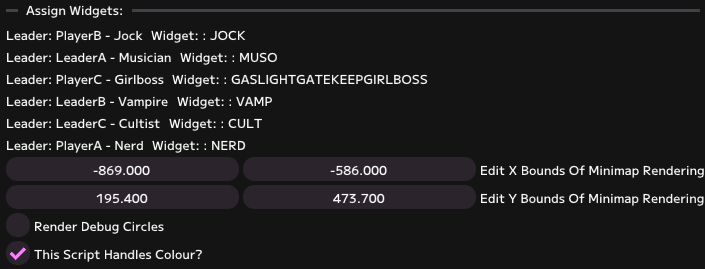
The script was responsible for one, or optionally two things. Managing the positions of a set of UI elements on the minimap, including setting whether or not they should draw,
and if so desired, managing the colour of those UI elements.
By breaking it down into these two core pieces of functionality, I was able to relatively neatly expose two interfaces to be edited by myself or my designer.
The script takes the worldspace positions of the leaders, and then remaps them to a defined set of boundaries on the UI element. This means that every valid position in the play space
is covered, and with minor tweaking, the boundaries of the nav map should reasonably map perfectly to the bounadries of the displayed map.
By seperating out the logic for colouring the units, we could handle both 'styles' of map seperately in one script. One that has three simple, generic shapes to represent
each unit, and one that uses portraits with a bit more personality!
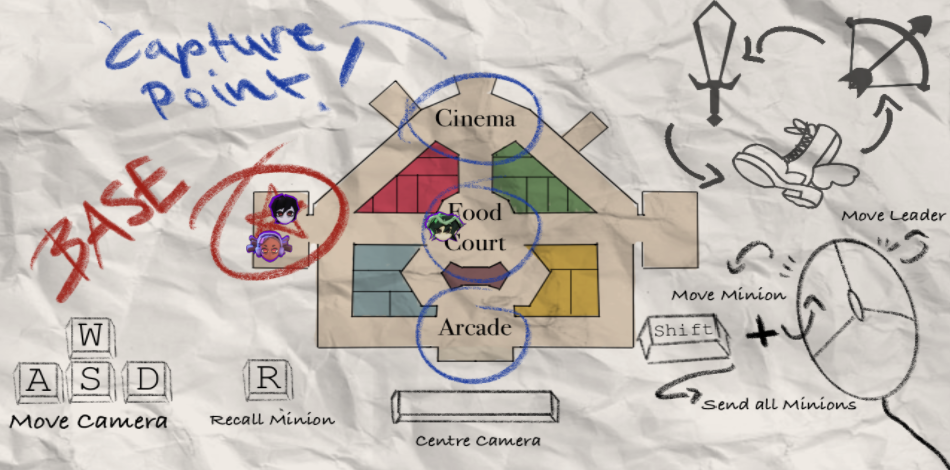
Above is the 'main' map you access by clicking Tab in game! Each leader has an icon created by one of our artists, and they all map to the same positions as the smaller minimap in the corner.
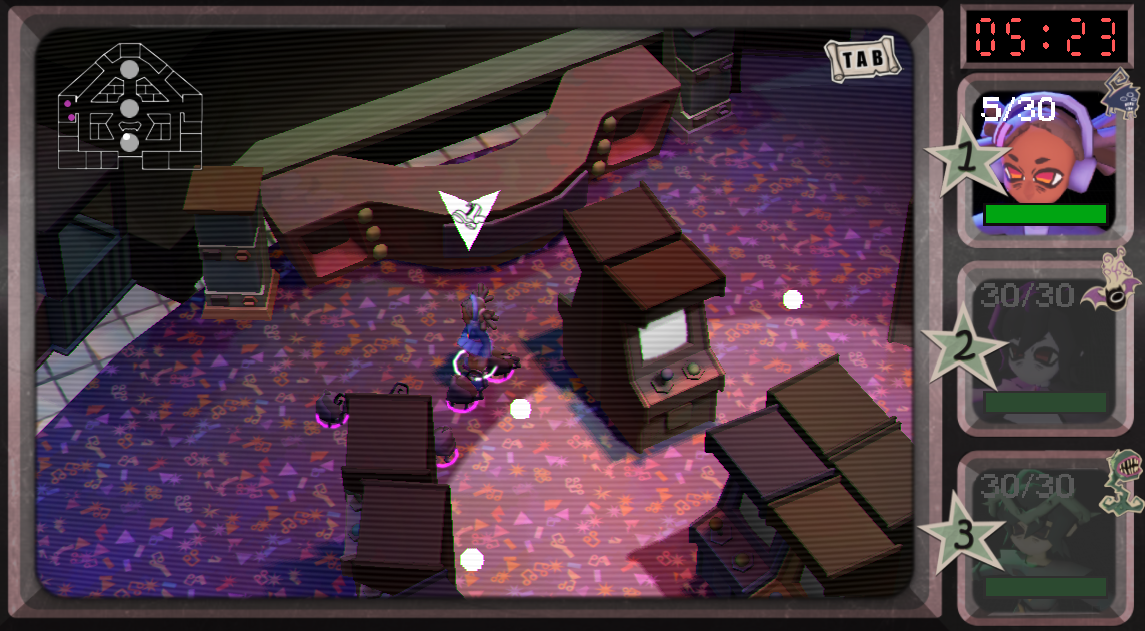
Blending both these maps together was a big part of capturing the game's feel, and the RTS vibe, I think. Having a map that shows a bit of personality (with scribbles and highlighter marks), while also having a simpler, always visible minimap let use very effectively control and display information in a way that felt right for the game!
What I learnt, and what would I do now?
The big thing would be more clearly plan for the presence of these scripts from day one. They were added under a bit of time pressure, and because of that felt a bit ad-hoc and all over the shop at the start. A later addition to the system from my co-programmer rolled their implementation into a sub-type of 'Component' that implicitly posessed one. This made things a lot clearer, and means that if any component in our game were to ever need them, it would simply involve changing the inheritance from Component to ExtenderScriptComponent. Had I thought of this earlier, I think the initial introduction of them to the codebase would have been smoother.
Overall, this was a lesson in code design for me. Building a system to fit a purpose, but also leaving doors open for further systems to be built on top of that base was a task that at the time I had vaguely taken on while building the engine, but never so specifically and arguably drastically mid development. But I think it was a fruitful venture in the end, and the scripts allowed us to add pinpoint and clear implementations of features where needed, rather than needing to create swathes of entirely new components and bloating the system quickly.